Showing posts with label flash. Show all posts

Thursday, 21 July 2011

Setting up CS5 and CS5.5 to target Flash 11 player

I've seen a lot of people looking for a way to publishing Flash 11 content from the CS5 and CS5.5 IDE, so here's a quick guide...

(I don't have CS5.5 myself, or a Mac, but have set it up on a mates machine so I know it can be done, please bare with me!)

1. If Flash is running, close it. Go into your Flash directory (usually Programs > Adobe > Flash) and find Common > Configuration > ActionSctipt3.0
In that folder you should see several folders, including FP9 and FP10 etc.
Create a new folder and call it FP11.


2. Download the globalPlayer.swc from Adobe labs.
http://labs.adobe.com/downloads/flashplayer11.html
Save it in your new folder. (it will have a longer name, so rename it to playerglobal.swc)

3. You need to create a player profile, so you can choose Flash Player 11 from Flash.
Under Common > Configuration > Players you will see a bunch of xml documents. Open the one called FlashPlayer10_1.xml or any Flash 10 player file.
In that you will see a path to a playerglobal.swc
Change the path so it points to the one you just downloaded and change the name of the player, etc.
There's 2 lines I changed in my CS5 version:

<player asversion="3" id="FlashPlayer11" version="13"></player>

and

<playerdefinitionpath as2="$(UserConfig)/Classes/FP10;$(UserConfig)/Classes/FP9;$(UserConfig)/Classes/FP8;$(UserConfig)/Classes/FP7" as3="$(AppConfig)/ActionScript 3.0/FP11/playerglobal.swc"></playerdefinitionpath>


(I don't know why it's version 13, but it is!)

Save the file in the same folder, as FlashPlayer11.xml
Here's a link to my file, if you're stuck, but it may vary slightly depending on where you have flash installed.
http://www.videometry.net/broomstick/FlashPlayer11.xml

Now you should be good to go!

Remember to choose Flash Player 11 in you publishing settings and Hardware Settings: "Level 1 - Direct" to turn on hardware acceleration.
When publishing, you need to publish direct to the browser (F12) as Flash will still have a F10 stand alone player for previewing/debugging.

If you want to run examples that use the EMBED tag you will need to download the Flex SDK.

Any questions, or variations you come across, just make a comment and I'll help if I can.

Good luck!

Tuesday, 17 May 2011

Mocap to Molehill, via 3D Studio MAX and Away3D Broomstick

After seeing David Lenaerts excellent Broomstick example, I've been eager to find a workflow to bring motion capture data into Flash. It took a while to work out, not being familiar with the MD5 format at all, but it turned out those nice guys at Away3D had already done all the hard work. I was thinking I'd have to map the bones of MAX's Biped to some other custom "MD5 scheme", but to my delight I discovered the parser is extremely generic and works with any bone structure I throw at it. I'd like to share my findings, not least in case I forget them before I need to do it again :O)

First a quick demo to show where we're headed...

(Click image to open, Flash 11 or incubator is required.) 

WARNING: The page loads around 14Mb of Motion Capture data, so be patient. When it's finished the "player" should start moving on his own. Click to put the flash window in focus, then use arrow keys to run, and the top row of keys (Q to I) to trigger different mocap files.  

You'll notice the motion is quite faithfully replicated, though there are some problems with the figure/bone structure around the shoulders. That could be fixed given the time, but I was satisfied with this as a proof of concept.
For this recipe you will need:
If you use that particular model you will see that it comes already rigged using Biped.
Biped is one of the Bone systems that ships with Max. Some love it, some hate it. The good thing is there's alot of free motion capture data recorded in the ".bip" format, to get you started.

Normally you use Max's Physique modifier together with Biped. This is a quite advanced system using muscles and tendons. The MD5 format doesn't support that system directly, so we need to use a Skin modifier instead. 
(Click for larger image)

After you open the soccer player, select the model, right click on the modifier and select "Collapse All".
Now you should have an Editable Mesh. This is the only format the MD5 exporter can work with so it's worth remembering.
Now we have an Editable Mesh and a Biped lined up with each other, but not attached in any way.
With the player still selected, choose the "Skin" modifier.
Where it says Bones, press the "Add" button and assign all the bones of the Biped to the Skin modifier (this will be all the objects in the scene). Then you modifier stack should look like this:


Now it's time to load some Motion Capture (or Mocap) Data. Select Bip01 (easiest by pressing the H key and selecting it from the list of scene objects) and then under the motion panel, press the Load icon and find a .bip file from your harddrive. If you don't have any .bip files, here's one from the Max Tutorials.


You will find a folder full of .bip files on your Max DVD under Tutorials, as well as loads of free downloads on the net. 
So now we should have an animation when you press play. The Soccer player should move in perfect synch with your Biped. You might notice a few odd bulges, especially round the legs and feet.


This is caused be the legs "pulling" on each other, and it's now we need to understand a little bit about how Skin and Bones (in this case Biped) work. 

Each bone acts upon a group of vertices in the Skin. A vertex may have more than one bone acting upon it. So for each bone there is an array of indices for the vertices in the model that it effects, and not only that, but each of those vertices has a "weight", i.e. the amount the bone pulls on that vertex.
To make it easier in 3D Studio, and other 3D programs, the bones are assigned an Envelope. This simply means a sausage shape around the bone's core that encapsulates the vertices. If in 3D studio, we select the soccer player again and "Edit Envelopes", when we select a bone from the list, the envelope of that bone is shown in the viewport.

Note, your own viewport may not look exactly the same, depending on the settings under "Display".
In the illustration you can see the envelope of the Left Foot. There are highlighted in colour, the vertices it effects. Red means they're effected a lot, blue means they're effected a little. Notice that some vertices on the other foot are highlighted in blue. This has happened because in the models start position, the feet were close together, and therefore the vertices on one foot were within the envelope of the other. This is the cause of many issues when setting up Bone systems, also referred to as Rigging.
Max offers many ways of editing envelopes, but I'm only going to talk about one quick and dirty method for now. The darker red circles around the foot represent the limits of the effect area for that bone. By clicking on the small grey boxes where they intersect you can select that outer limit, and then adjust it's radius, either by dragging on it, or more precisely with the number spinner in the menu. By making it smaller, at some stage the vertices of the other foot are no longer effected. You need to adjust both feet before the model starts to look right. Then continue with the carves and thighs.
This subject is covered better in other tutorials on the net, but that should get you started.

NOTE: Make sure you have no zero weights in your model. If a vertex is connected to a bone with a weight of 0.000, it has the effect of attaching that vertex to the root of the model when imported into Away3D.
To avoid this, when you have finished rigging, set the "Remove Zero Limit" in the skin modifier palette to 0.01 and hit "Remove Zero Weights". You are then ready to export.

Finally it's time to export to MD5. Under Max Script, choose Run Script and find the MD5 exporter script you downloaded earlier. I tend to put my scripts in the script folder of Max, just because it's the default directory opened by Max. 


Choose export and you'll be prompted to choose a name for your file. Then you will be asked for another name for the animation file. These two files (.md5mesh and .md5anim) are needed for the mocap animation, and generally speaking need to come from the same model. However, when you have exported one mesh, you can then apply another bip file and tick "export md5anim only" so you use the same model with different motion files, as in the example.

NOTE: When you press "Export", your computer will most likely freeze. Max Script, much like other scripting languages, can paralyse your processor when running through big loops, and believe me there's a lot of number crunching and writing going on here. My advice, go make a cup of coffee. On my machine the exporter hasn't actually crashed yet, though I have sometimes lost patience with it and restarted Max. You can improve performance, by going into Max's preferences and increasing the allocated memory for script. (Customize>Preferences>Max Script> Initial Heap Allocation). I set mine to 50Mb. 

Now all that's left is to look at the source for David Lenaerts example from the Away3D repository and start swapping his files out with your own. I have included the entire source of my effort here, though admittedly it's not commented very well. The material has been made into a mipmap, i.e. resized to a square in Photoshop.
For some reason the texture coordinates get reversed between md5 and Broomstick. I guess this may change in future builds, but for now the work around was simply to reverse the number on the players shirt in Photoshop.

Disclaimer: The Broomstick branch of Away3D is in constant development, as is the Flash player, and there is no guarantee these files will work with your installed library, without a little tweeking :O)
(They are compiled against the github version, 24th may.)

NOTE: A difference in the coordinate space between MD5 format and Flash results in all models and animations being mirrored on the x-axis when viewed in Away3D 4.0
To see animations and models as they appear in MAX, simply apply a scaleX = -1; after import to Away3D.

Enjoy! And please comment with your successes, failures, comments and tips!

UPDATE: In response to the high demand, (from MatOfLink at least) here's a method for putting guns in hands, shoes on feet, hats on head, etc.
When your MD5 mesh has loaded, add a Loader3D to it. This is where your prop will appear.


gunholder = new Loader3D();
gunholder.addEventListener(LoaderEvent.RESOURCE_COMPLETE, adjustGun);
_mesh.addChild(gunholder);


So far so good. When the gun loads it will likely be twisted in relation to the rest of the model, depending on which format it is and which software it was exported from. For obj files coming from Max I've found this simple routine aligns the object the same way as in Max. At the same time you can apply materials.


private function adjustGun(evt:LoaderEvent):void {

var i:int;
var gunMat:BitmapFileMaterial = new BitmapFileMaterial("assets/images/gun.jpg");
for (i = 0; i < gunholder.numChildren; i++) {
var m:Mesh = gunholder.getChildAt(i) as Mesh;
m.rotationX = 90; 
m.rotationY = 90;
m.material = gunMat;
}
}


Now your gun should be in the viewport. You need to know the index of the particular bone you want to follow. This you can either read in the debugger, by trial and error, or via the jointIndexFromName from name function on the skeleton class (later...)


Once you know the index of the bone (called "joint" in Away3d) you want to follow add this to your rendering loop:


gunHolder.transform = (_mesh.animationState as SkeletonAnimationState).globalPose.jointPoses[26].toMatrix3D();


And that's it! You basketball player is now armed and dangerous.
If I get round to it I'll post an updated source. Otherwise shout out below for help!


Now let's see some games...


Saturday, 16 April 2011

Waves and models


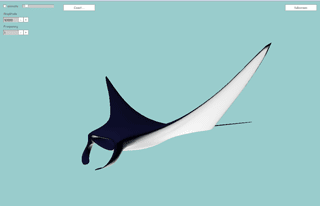
A practical application of a wave formula, animating a Manta Ray.

To keep the body steady while animating the "wings" the formula applies amplitude depending on distance from the centre, multiplied by a cosine to give a fairly smooth transition from centre to wing tip. The formula is still fairly simple and can definatly be improved upon. The movement, though graceful is not true to life (yet).

The Coast/Swim button will freeze and start the animation less abruptly then simply turning animation on and off.

This demo was inspired by a WebGL JellyFish by Aleksandar Rodic.

The source files are there. The model, by "Kare Ola" can be downloaded from TurboSquid

Friday, 15 April 2011

Wave Modifier


Spurned on by the success of my first Away3D 4.0 Experiment and what with it being friday afternoon, I thought I'd try another one.
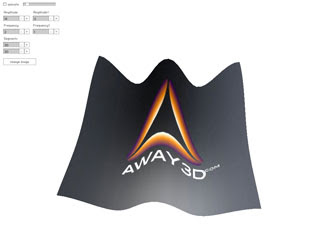
After looking at the docs (I know, cheating really) I tried making a wave modifier.
Considering the maths is all on the CPU it runs quite well. There is massive room for optimisation by making the wave function run as a GPU program. Maybe something for next friday...

Looking at the code it might look complicated, but that's just me over-engineering the demo. The interesting bit is "incrementWave" that basically moves all vertices in the Z plane using a sign function, depending on their x and y positions.

"Change Image" gives you a grid pattern so you can see the wave more clearly.

Monday, 1 November 2010

Mountains from Molehill

I've always been quick to criticise Adobe for their handling of Flash and the Flash community and so I feel it's only fare to give them deserved kudos in light of recent developments.

I'm mainly referring to the upcoming Molehill 3D API's, but also their inroads into the mobile market.
While we lowly developers will have to patiently wait for the "the first half of 2011" to get our hands on the new Flash Player with access to OpenGL/DirectX, I think it's worth noting that Adobe have been smart enough to allow leaders in the realm of 3D Flash, namely the excellent Away3D and Alternativa teams, early access to the technology. They have already built convincing demos, http://www.bytearray.org/?p=2310.

After a shaky year which has seen Flash scuppered by Apple, only to be reinstated, it now looks like Flash will retain it's title as the absolute most ubiquitous platform for multi-media applications on practically all platforms, web, iOS, Android, Windows mobile and emerging TV technologies.

I am excited to be a Flash developer again. I can peddle my wares with confidence and continue to maintain over for my clients that Flash is the best platform currently available for their projects and will continue to be so, giving longevity to their investments in online/mobile applications.

Just a year ago I was daunted by the idea that I would have to master new technologies and languages to operate in the fragmented world of mobile devices. Now, through the hard work of the Adobe engineers we can effortlessly leverage our flash skills in new areas. It is a wonderful gift they have given us and I am truly thankful (for once!)

My two main skills have always been Flash and 3D. Flash in 3D has always been one huge workaround. To see these two mediums come together so convincingly is truly awe inspiring. I'm looking forward to making Mountains out of Molehill and pushing the *new* boundaries of Flash.

UPDATE: Now Available on Labs! http://labs.adobe.com/technologies/flashplatformruntimes/incubator/

Thursday, 12 November 2009

Marching ants revisited...


When you're creating online applications you often want to mimic the tools people are used to from the desktop. The classic marching ants selection marker is a good example and even easier than before, now that the lineBitmapStyle has been added to AS3.


matrix.translate(0.5, 0);
this.graphics.clear();
this.graphics.lineStyle(1);
this.graphics.lineBitmapStyle(ants, matrix, true, false);
this.graphics.drawRect(downX, downY, extentX, extentY);


Fullpage Example Click and drag to make a marker.
Flash Source

Thursday, 22 October 2009

My HERO


A few days ago I recieved my new phone. With all the recent hype about CS5 and iPhone it may have escaped some flash developers attention that the HERO already ships with Flash player. Currently this only runs AS2, although video is running perfectly (YourTube, TED) in fullscreen, and the F10 player is on the way. What can I say, the HTC HERO is the best phone I've ever seen. It has all the polish and easy of use of the iPhone, but the operating system is open source, and the majority of apps are free. Some of those free apps blew me away. Layar is the first usable Augmented reality app I've tried, though I know there are similar apps out there. The phone comes all rigged up to several Google services, search (naturally), maps, mail and my favourite, a Google app called Sky Map, that instantly turns you into an expert on the constellations. I always wanted to learn the night sky and with this app you just point the phone in any direction and it shows you the names of the stars you're looking at. The first thing I saw looking south out of the window was Uranus. I never knew you could see Uranus with the naked eye ;O)

I am impressed. There was an app I couldn't find though, a magnifying glass, so today I downloaded the SDK and built it! Depsite the fact I've never actually written a Java application before, this evening I made my first Android application, using completely free tools. The Android phone emulator makes developing for Android phones a doddle. When you're used to Flex, using Eclipse for Java is a no brainer. Once you get over the initial differences in syntax, developing Java is very similar to making AS3 projects in Flex and I would encourage any Flashers turned Flexers to give it a try. You never know, it may be the start of a new career...

Over the weekend I intend to get the app finished and on the app store. If that proves possible, it will be the absolute fastest "from-idea-to-market" cycle ever!

If like Bonnie Tyler you've been holding out for a Hero, wondering whether to buy one or not, my advice is go for it, 100%. Apparently the first version with HTC "TouchFLO" was a bit choppy, but that's been fixed and mine came with the very latest BIOS already pre-installed.

Monday, 28 September 2009

3D Studio MAX clone - alpha 0.0.1 :)

A friend of mine has been making 2D floorplan tools in Flash since MX.
A couple of years ago I built a 3D option for him, based on the then open source Flux player(X3D).
When MediaMachines turned into Vivaty, the javascript API broke and player was no longer open source, and that was the end of the solution we spent 6 months developing. Ouch! Since then we've been looking for another option based on open source technology.
In the meantime, maybe flash has come of age to do this type of thing?
I've seen Autodesk's attempt, and while I understand their thinking, for me going totally isometric/single angle is just too big a compromise.


As a proof of concept I used a couple of hours making a demo in Away3DLite. Out of laziness and lack of time I've used the Plane primitive for walls, where a custom class is called for to add thickness and get around z-ordering issues.

So here it is, the simplest 3D editor you're likely to see :)
http://www.videometry.net/floorplan/


Use the pencil to draw a few boxes and hit the "3D" icon for a rough 3d model. Be warned at the moment the eraser just clears everything, without a prompt.

UPDATE: Save floorplan or 3d drawing as .png, straight to your harddisk.
Flash 10 required, but hey, you wouldn't be here if you didn't have FP10, right? :)

Sunday, 13 September 2009

Away3d lite, first test

The first test og Away3dLite looks promising.
http://www.videometry.net/away3d/AwayTest.html
(Click the screen to start)

I fudged the BitmapMaterial so I could use a shader as input.
At 30 fps there seems to be no performance hit at all. At higher framerates the shader does cause a dip compared to using a plain bitmap. The size of textures seems to affect framerates dramitically when using shaders generally.

Saturday, 12 September 2009

Normal Mapping


Normal mapping has now been added to Atomic.

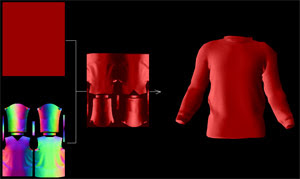
Normal maps provide a fast alternative to, for example phong shading and other lighting models, and at the same time enhances simple geometry.
The normal filter adds less than 1Kb to the size of the engine, but adds a fast, smooth, directional lighting.

Click the image to open the example, click and drag to rotate and zoom

Tuesday, 8 September 2009

Atomic Kitten

Atomic, the new 3D renderer is purring like a kitten, even with full mapping and baked ambient occlusion.
http://www.videometry.net/atomic/town.html


There's zoom when you click and drag in the y-axis. I discovered to my horror the scrollwheel *still* doesn't work natively in Flash player 10 on Mac. Sorry about that, will use alternative from now on...

Wednesday, 2 September 2009

Introducing Atomic

Here's a first glimpse of our new 3D class for Flash10, Atomic.
Wait a while for the 300K model to load then click the screen to start. There's some primitve navigation via mouse position.

This actual t-shirt design is available at http://www.bluebaldur.com/

The idea of Atomic is to be like the atom itself, very small yet surprisingly powerful.
Rendering quality is the number one priority, closely followed by speed. Materials are written as shaders in Pixel Bender. The example uses a material that combines a Normal and Diffuse map.

Why a new "flash 3D engine"? With Flashplayer 10, a little knowledge of 3D maths and shaders, the developer can arguably achieve just as good, and maybe even better results using Flashes inbuilt classes than importing large external libraries.
The missing element right now is that Flash player supports no native 3D formats, and that the drawing API does not support native z-sorting. Atomic handles these two issues, leaving the rest up to the developer and the particular project.

Sunday, 30 August 2009

DepthMask Filter New Example


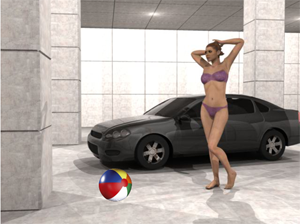
This example shows the exact same filter, but a more complex 3D scene.
As before, you can click and drag the object in x and y planes, and use the scroll wheel to move in the z plane.
Try moving the beachball around the scene and notice that it is masked correctly in all 3d positions.
You can place it between the car and figure, or halfway through the windscreen, behind a pillar, etc.
The actual 3d Studio Max scene fills around 25Mb, as appose to 150Kb as an image+ depthmap.

Now just to add some normal mapping (example here) to both background and object to get the lighting right...

Monday, 17 August 2009

DepthMask Filter

When is 3D not 3D? Well, all the time when it comes to computer monitors, 3D is merely a 2D illusion.
The generally accepted way to producing this illusion is to draw 1000's of triangles based on a geometric model of an object, or group of objects in a scene resulting in hundreds of thousands of calculations per frame. There are other ways. There are other techniques that also mimic 3D, but avoid geometry altogether.

Here we have an example of one such method, which could be readily combined with others, including actual geometry.
Click on the image for a Flash10 example.

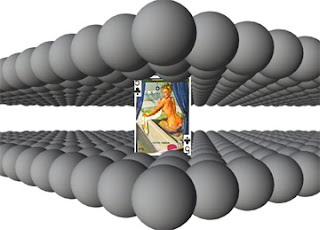
The balls are just used to add some complex geometry, but the scene could be anything, a room, a town, spacecraft interior, you name it. When the page first opens you see the depth mask. This contains the depth of each pixel in the image represented by a greytone.


pixel depth represented by greyscale

By comparing the position of the playing card in space it's easy to work out which pixels would be infront of the card (visible) and which ones would be behind the card (invisible). A pixel bender filter runs through each pixel and decides whether to use the playing card or to draw a transparent pixel. This is then shown over a pre-rendered version of the scene, and voila, the playing card is more or less perfectly masked at every position and depth in the scene.

So why might you want to do that? Well you could replace a great deal of background geometry with a single bitmap and still have characters walking in and out of obstacles in the scene. This means smaller downloads and far less processor power needed, so not a bad idea for web based games.

Monday, 4 May 2009

Program in Flash, view in 3D


In the past we've used Flash to control an X3D plugin. It worked, but was kind of limited. With the O3D plugin literally everything is exposed to javascript, and as Flash can call javascript throught the ExternalInterface it follows that is it straight forward to control the O3D plugin from Flash.

http://www.videometry.net/o3d/FlashPiggyback.html

(click and drag the white circle in the flash movie and it updates the position of the 3d teapot in realtime)

I've had some problems loading tgz in Firefox from my own server, not sure why yet. Offline everthing works fine in both Firefox and IE on Windows. If you have trouble viewing the demo, or just want to see how it's done the source files are here

UPDATE: By changing the file type of the .tgz file it can be loaded in FireFox and IE and the example has been updated to reflect this. Offline, it seems the file has to be a .tgz to function properly.