Showing posts with label shaders. Show all posts

Monday, 21 September 2009

Atomic Fusion


Still playing around with Away3dLite.

It's a huge advantage when you want to extend a framework for your own purposes, that the framework itself is compact and understandable. That's certainly the case with this lastest version of Away3d. I've been working for some time with high fidelity models, X3D import and custom material filters. This work has been easy to migrate to Away3dLite, which is an even faster rendering engine then anything I've been able to code. I look forward to publishing all the fruits of this labour, but for now here's a demo done last friday afternoon just for the fun of it.

http://www.videometry.net/away3d/chopper.html
and source files...
http://www.videometry.net/away3d/Chopper.zip

Enjoy!

Sunday, 13 September 2009

Away3d lite, first test

The first test og Away3dLite looks promising.
http://www.videometry.net/away3d/AwayTest.html
(Click the screen to start)

I fudged the BitmapMaterial so I could use a shader as input.
At 30 fps there seems to be no performance hit at all. At higher framerates the shader does cause a dip compared to using a plain bitmap. The size of textures seems to affect framerates dramitically when using shaders generally.

Saturday, 12 September 2009

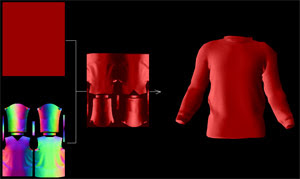
Normal Mapping


Normal mapping has now been added to Atomic.

Normal maps provide a fast alternative to, for example phong shading and other lighting models, and at the same time enhances simple geometry.
The normal filter adds less than 1Kb to the size of the engine, but adds a fast, smooth, directional lighting.

Click the image to open the example, click and drag to rotate and zoom

Wednesday, 2 September 2009

Introducing Atomic

Here's a first glimpse of our new 3D class for Flash10, Atomic.
Wait a while for the 300K model to load then click the screen to start. There's some primitve navigation via mouse position.

This actual t-shirt design is available at http://www.bluebaldur.com/

The idea of Atomic is to be like the atom itself, very small yet surprisingly powerful.
Rendering quality is the number one priority, closely followed by speed. Materials are written as shaders in Pixel Bender. The example uses a material that combines a Normal and Diffuse map.

Why a new "flash 3D engine"? With Flashplayer 10, a little knowledge of 3D maths and shaders, the developer can arguably achieve just as good, and maybe even better results using Flashes inbuilt classes than importing large external libraries.
The missing element right now is that Flash player supports no native 3D formats, and that the drawing API does not support native z-sorting. Atomic handles these two issues, leaving the rest up to the developer and the particular project.

Sunday, 30 August 2009

DepthMask Filter New Example


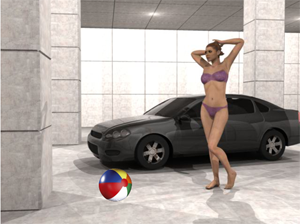
This example shows the exact same filter, but a more complex 3D scene.
As before, you can click and drag the object in x and y planes, and use the scroll wheel to move in the z plane.
Try moving the beachball around the scene and notice that it is masked correctly in all 3d positions.
You can place it between the car and figure, or halfway through the windscreen, behind a pillar, etc.
The actual 3d Studio Max scene fills around 25Mb, as appose to 150Kb as an image+ depthmap.

Now just to add some normal mapping (example here) to both background and object to get the lighting right...

Monday, 17 August 2009

DepthMask Filter

When is 3D not 3D? Well, all the time when it comes to computer monitors, 3D is merely a 2D illusion.
The generally accepted way to producing this illusion is to draw 1000's of triangles based on a geometric model of an object, or group of objects in a scene resulting in hundreds of thousands of calculations per frame. There are other ways. There are other techniques that also mimic 3D, but avoid geometry altogether.

Here we have an example of one such method, which could be readily combined with others, including actual geometry.
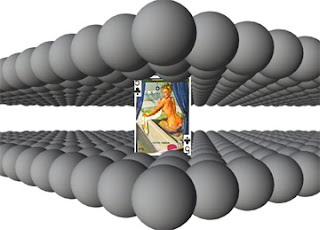
Click on the image for a Flash10 example.

The balls are just used to add some complex geometry, but the scene could be anything, a room, a town, spacecraft interior, you name it. When the page first opens you see the depth mask. This contains the depth of each pixel in the image represented by a greytone.


pixel depth represented by greyscale

By comparing the position of the playing card in space it's easy to work out which pixels would be infront of the card (visible) and which ones would be behind the card (invisible). A pixel bender filter runs through each pixel and decides whether to use the playing card or to draw a transparent pixel. This is then shown over a pre-rendered version of the scene, and voila, the playing card is more or less perfectly masked at every position and depth in the scene.

So why might you want to do that? Well you could replace a great deal of background geometry with a single bitmap and still have characters walking in and out of obstacles in the scene. This means smaller downloads and far less processor power needed, so not a bad idea for web based games.